Broken by Default: New Vulnerabilities in IBM WebSphere Liberty Can Lead to Full Server Compromise

Executive Summary
IBM WebSphere Liberty is a cornerstone of enterprise Java infrastructure. Deployed widely as a lightweight, cloud-friendly application server, it powers business-critical services, administrative control planes, and authentication workflows across industries including finance, healthcare, government, and SaaS. Oligo Security Research has uncovered multiple vulnerabilities in WebSphere Liberty affecting both its security and administrative components. The most critical is a pre-authentication arbitrary class deserialization vulnerability in the SAML Web SSO component. A single ignored return value in a String.concat() call makes a cookie integrity check useless, letting an unauthenticated attacker feed arbitrary serialized Java objects to the server as long as there is a reachable SAML endpoint. Beyond the SAML component, we examined WebSphere Liberty’s management console, AdminCenter, which has a role based access model, cryptographic token signing, and a utility for encrypting sensitive configuration values. Our research found that the AdminCenter's entire security model unravels when you pull at it. Reader role users can read files they shouldn't, hardcoded passwords protect the token signing keys, and IBM's recommended encryption utility ships with hardcoded keys in every mode it offers.
The 7 flaws we reported to IBM create multiple pathways for attackers to move from network-level exposure or limited access to full server compromise. They include:
- CVE-2026-1561: Pre-authentication unsafe deserialization in SAML Web SSO, ultimately enabling remote code execution in SSO-enabled deployments
- CVE-2025-14915: Access control flaw in the AdminCenter API allows any authenticated user, including low-privilege readers, to retrieve sensitive server files like ltpa.keys, enabling attackers to forge authentication tokens and impersonate any user.
- CVE-2025-14917: The use of hardcoded default password to encrypt LTPA keys allows any attacker who obtains the key file to decrypt it and forge authentication tokens, enabling full administrative impersonation.
- Finding 4: AdminCenter exposes the full server.xml configuration, including plaintext credentials, to low-privilege users, allowing reader-role accounts to directly view and obtain administrator passwords.
- Finding 5: The tool’s default encryption relies on a fixed single-character XOR key, making every encoded password reversible.
- CVE-2025-14923: SecurityUtility AES encryption relies on a hardcoded, universal key, allowing any encrypted credentials (past and present) to be trivially decrypted, exposing all stored passwords to low-privilege users with configuration access.
- CVE-2025-14914: Zip-slip vulnerability in AdminCenter’s file upload API allows authenticated administrators to write arbitrary files anywhere on the server, enabling full system compromise through configuration overwrite or remote code execution.
Due to the criticality of the vulnerabilities and the chains they enable, we coordinated disclosure with IBM and opted to publish our findings after the publishing of the security bulletins for the CVEs, with the last one published on March 24, 2026.
In this report, we walk through the technical details of the flaws and the possible chains.
Why WebSphere Liberty Is a High-Value Target
Liberty is designed as a modular, containerized-friendly runtime for Java enterprise applications. It is commonly deployed as a containerized application server in Kubernetes environments, as the backend runtime for internal enterprise services, integrated with SSO and identity management systems, and as a management layer for configuration and operational workflows.
Like other deeply trusted infrastructure components, Liberty often has privileged access to sensitive credentials and secrets, authentication and encryption keys, administrative APIs, and high-privilege runtime contexts. When vulnerabilities affect Liberty's security and admin components, the blast radius extends well beyond a single server, creating opportunities for privilege escalation, persistent access, and deeper lateral movement inside enterprise environments.
Finding 1: Pre-Auth Arbitrary Class Deserialization via Forgeable SAML Cookie (CVE-2026-1561)
Affected versions: WebSphere Liberty 17.0.0.3-26.0.0.3
CVE-2026-1561 is the most severe out of this class of vulnerabilities, given it does not require credentials, authentication, a valid session, or a specific role assignment. All that’s required is a network path to a SAML enabled WebSphere Liberty instance.
A Quick Primer on SAML SSO
SAML (Security Assertion Markup Language) is a protocol for single sign-on. Instead of each application managing its own login, users authenticate once with a central Identity Provider (IdP), which then issues signed assertions that other applications (Service Providers) accept as proof of identity. WebSphere Liberty can act as a SAML Service Provider, accepting these assertions and creating local sessions for authenticated users. Enabling this requires just two configuration lines, and many enterprise deployments use it as their primary authentication mechanism.
The Setup
SAML Web SSO needs a way to "remember" where a user was trying to go before they got redirected to the IdP to log in. WebSphere Liberty solves this by serializing a Java InitialRequest object and storing it client-side in a browser cookie named WASInitialRequest_<relayState>.
Because cookies are controlled by the client, this is a dangerous design from the start. The server is asking an attacker-controlled transport to hold a Java-serialized object that it will later deserialize. The code recognizes this risk and tries to protect the cookie with a tamper detection suffix. It appends a digest that is supposed to be derived from the cookie contents combined with a server-only secret, so that only the server can produce a valid cookie.
The Bug: One Ignored Return Value
The vulnerability lives in InitialRequestUtil inside the jar com.ibm.ws.security.saml.websso.2.0_1.0.108.jar, specifically in the method digestInitialRequestCookieValue(...).
The digest computation is supposed to incorporate a server-side secret into the hash. But due to a String.concat() misuse, the secret never makes it into the calculation.
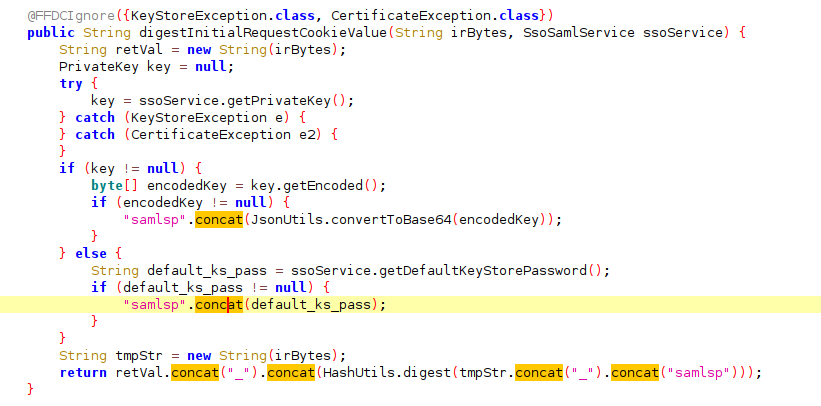
In Java, String.concat() does not modify the string in place. It returns a new string. The code calls concat() to append the secret to the data being hashed, but ignores the return value. The original string is unchanged. The digest ends up being computed over the cookie contents plus a fixed constant, with the secret contributing nothing.
The integrity check becomes meaningless. The "server-only secret" that's supposed to prevent forgery is never part of the equation. An attacker can compute valid digests for arbitrary cookie values because the digest algorithm operates on attacker-controlled input plus a constant.
The Impact: Pre-Auth Arbitrary Class Deserialization
Once the server accepts the forged cookie as "valid," it reconstructs the saved state by passing the cookie's contents to ObjectInputStream.readObject(). This is the canonical dangerous deserialization pattern in Java: raw ObjectInputStream deserialization of attacker-controlled bytes.
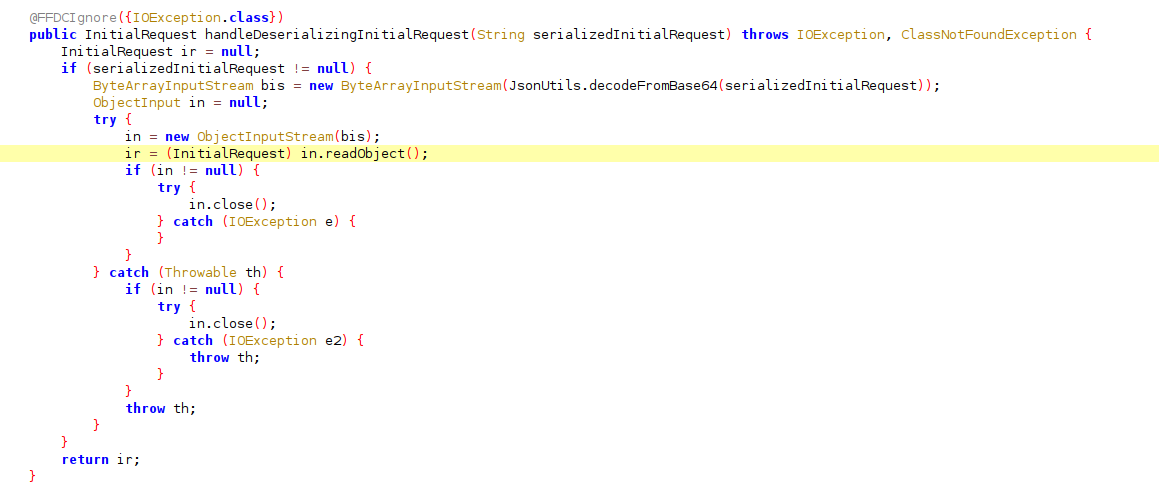
An attacker can construct a serialized Java object of any class available on the server's classpath and deliver it through the forged cookie. The server will deserialize it, triggering whatever side effects the class's deserialization logic produces. This results in pre-authentication arbitrary class deserialization with full attacker control over the deserialized object graph.
The affected configuration:
<feature>samlWeb-2.0</feature>
The vulnerability left WebSphere Liberty deployments with SAML Web SSO enabled affected.
Inside the Walls: AdminCenter's Collapsing Defenses
While the SAML vulnerabilities are pre authentication, we found multiple additional issues in WebSphere Liberty's internal security model for authenticated users.We found that a low-privilege reader-role user can escalate to full administrator and achieve remote code execution (RCE) due to ineffective protection mechanisms.
The Target: AdminCenter's Trust Model
WebSphere Liberty's AdminCenter ships with two built-in roles. The administrator-role grants full control: configuration changes, application deployment, file uploads. The reader-role is meant to be safe, a monitoring-only view for operators who need visibility without the ability to break anything.
A typical configuration looks like this:
<server description="Admin Center + admin REST session">
    <featureManager>
        <feature>adminCenter-1.0</feature>
        <feature>appSecurity-2.0</feature>
    </featureManager>
    <basicRegistry id="basic">
        <user name="admin"  password="adminpwd" />
        <user name="reader" password="readerpwd" />
    </basicRegistry>
    <administrator-role>
        <user>admin</user>
    </administrator-role>
    <reader-role>
        <user>reader</user>
    </reader-role>
    <remoteFileAccess>
        <writeDir>${server.config.dir}</writeDir>
    </remoteFileAccess>
</server>
Oneimportant detail to remember is that the passwords are stored in plaintext. (We’ll come back to this later in the blog).
Finding 2: The Reader That Reads Everything (CVE-2025-14915)
Affected versions: WebSphere Liberty 17.0.0.3 - 26.0.0.3
The AdminCenter API includes a file-access endpoint that's supposed to respect the remoteFileAccess configuration and role boundaries. We found that any authenticated user, including those with only the reader role, can read every file in the server installation directory, regardless of remoteFileAccess settings.
This also allows a low privilege user to return the raw contents of ltpa.keys, the private key material used to sign LTPA authentication tokens.
To understand why this file matters, let’s take a brief detour. LTPA is WebSphere's mechanism for managing authenticated sessions. When a user logs in, the server generates an LTPA token: a signed cookie that proves the user's identity for subsequent requests. The token is signed using cryptographic keys stored in the ltpa.keys file on the server. If you have those keys, you can forge tokens for any user, effectively impersonating them without knowing their password.
On its own, reading arbitrary files is a serious information disclosure issue. But the ltpa.keys file specifically turns a file-read into an authentication bypass. The question is: are those keys usable?
Finding 3: The Hardcoded LTPA Keys Password (CVE-2025-14917)
Affected versions: WebSphere Liberty 17.0.0.3 - 26.0.0.3; CVSS Severity (NVD): 9.8
LTPA keys are encrypted with a password precisely to prevent the scenario above. Even if an attacker obtains the key file, they shouldn't be able to use it without the encryption password.
We found that WebSphere Liberty uses a hardcoded default password to encrypt LTPA keys.
The password is simply constant, across all default installations. Anyone who reads the ltpa.keys file can decrypt it with this password and forge LTPA tokens for any user, including the admin.
This means a reader-role user can now authenticate as the administrator.
This is our first path to escalate privileges from a reader user to administrator. Let's take a look at the second privilege escalation we found.
Finding 4: The Configuration That Tells You Everything
One of AdminCenter's core features is a web-based view of the server configuration. The server.xml configuration file, which contains usernames and passwords as shown earlier, is fully visible to reader-role users through the AdminCenter interface.
This means the reader can see the admin's plaintext password directly in the configuration view.
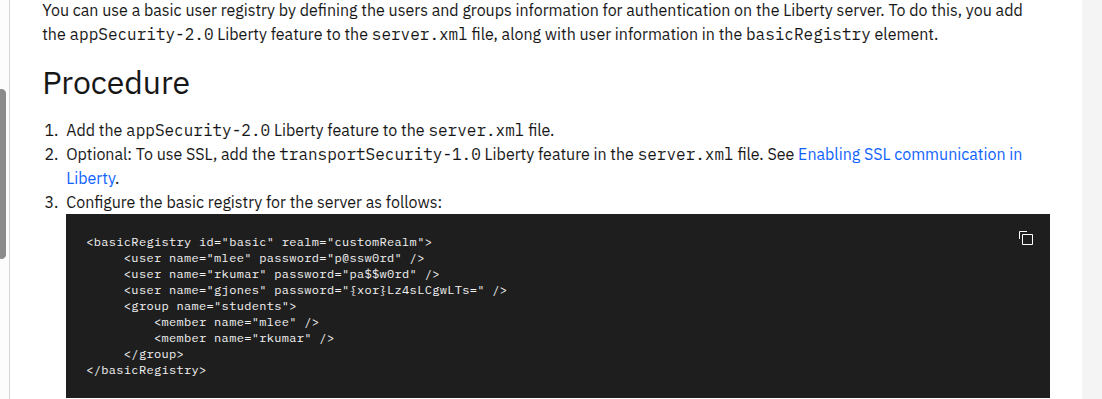
IBM's own documentation demonstrates this exact configuration pattern: passwords in plain text in server.xml. And the AdminCenter helpfully shows a banner recommending the securityUtility tool to avoid storing passwords in the clear.
Finding 5: The XOR "Encryption"
The securityUtility tool encodes passwords so they don't appear in plain text in configuration files. Its default mode uses XOR with a fixed, single-character key: the underscore character (_).
The "key" is a single hardcoded character. Any password "protected" by the default securityUtility encoding can be reversed instantly. A security-conscious administrator who followed IBM's own recommendation to use securityUtility would have passwords that are trivially recoverable.
But a truly diligent administrator might notice the XOR weakness and choose the AES option instead. But our research uncovered a flaw in that too.
Finding 6: The Hardcoded AES Key (CVE-2025-14923)
Affected Versions: WebSphere Liberty 17.0.0.3 - 26.0.0.2; CVSS Severity (NVD): 9.8
When using securityUtility with the AES algorithm, passwords are encrypted using AES, a well-known encryption algorithm. The problem is that the default AES key is hardcoded.
We verified this by building a simple WAR web application that accepts an AES encrypted securityUtility output and decrypts it using the hardcoded key. We tested it across multiple independent WebSphere instances. Every password encrypted by securityUtility's default AES mode on any instance decrypted successfully with the same key.
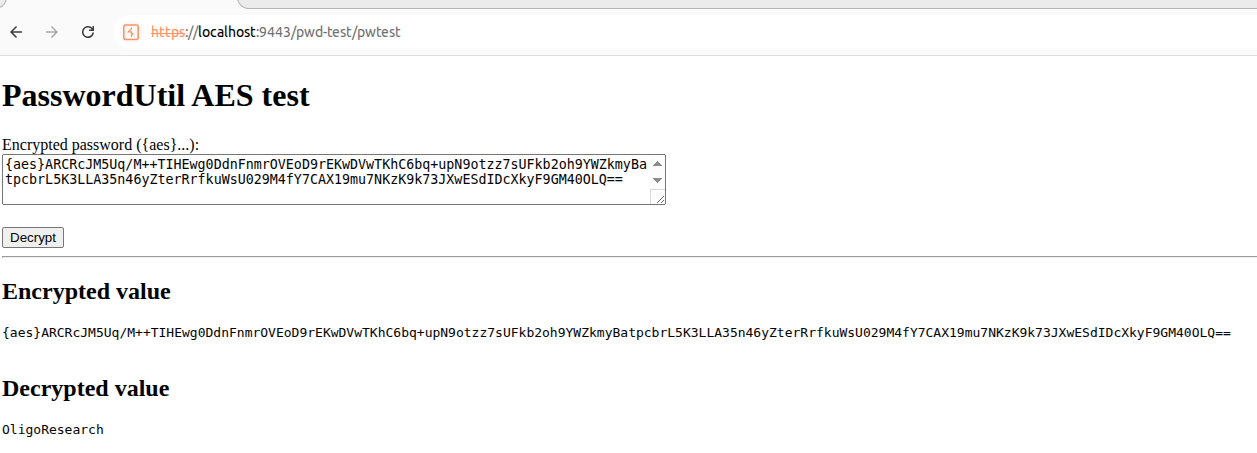
The impact here is not just forward-looking. Every password that was ever encrypted using securityUtility's default AES mode can be decrypted. Configuration files backed up years ago, old server snapshots sitting in version control, decommissioned environments archived to shared drives, credentials rotated long ago but still present in config history. If they were encrypted with the default key, they are readable now and always have been.
Organizations that treated AES encrypted configuration values as safe to store in plaintext repositories have been accumulating decryptable secrets for as long as they've used the tool.
To recap,IBM offers three tiers of credential protection:
- Plain text - readable by anyone with config access (including reader-role users).
- XOR encoding - reversible with a single-character fixed key.
- AES encryption - uses a hardcoded key that's identical across all installations.
Every protection option can effectively be bypassed. A reader-role user who can view the configuration can recover every password regardless of which protection mechanism was chosen.
Finding 7: Arbitrary File Write via Zip Slip (CVE-2025-14914)
Affected Versions: WebSphere Liberty 17.0.0.3 - 26.0.0.1
With admin credentials in hand (obtained through any of the paths above), we turned to the file upload API. AdminCenter allows administrators to upload files to the configured writeDir (typically ${server.config.dir}). Path traversal characters are validated against this root, preventing direct directory escape.
But one of the upload endpoints accepts zip files with an expandOnCompletion=true parameter that triggers server-side extraction. The extraction logic does not validate zip entry paths for traversal sequences, creating a classic zip-slip vulnerability.
The traversal escapes the configured write directory, enabling arbitrary file writes anywhere on the filesystem that the Liberty process can reach. From here, the attacker can overwrite server configuration, drop a malicious WAR for code execution, or plant a web shell.
The Chain: Reader to Admin to RCE
Here's how findings 2 through 7 connect into a full privilege escalation chain:
Step 1: Read the configuration. A reader-role user accesses the AdminCenter configuration view and sees either plain-text passwords, XOR-encoded passwords, or AES-encrypted passwords. In all three cases, the actual admin password is recoverable.
Step 2 (alternative path): Forge an admin token. If the admin password isn't directly in the configuration, the reader-role user leverages the unrestricted file-read primitive to download ltpa.keys. The keys are encrypted with the hardcoded password WebAS. The reader decrypts the keys and forges a valid LTPA admin token.
Either path delivers admin-level access.
Step 3: Arbitrary file write via zip slip. With admin credentials, the attacker uploads a crafted zip file that escapes the write directory, achieving arbitrary file writes and ultimately remote code execution.
The full chain: reader credentials -> admin access (via plaintext/XOR/AES password recovery or LTPA token forgery) -> arbitrary file write -> remote code execution.
The Full Picture
Stepping back, we found two independent attack paths into WebSphere Liberty. Together they reveal a systemic problem.
Path A (pre-auth): An unauthenticated attacker achieves arbitrary class deserialization on any SAML-enabled deployment through a forged cookie. The protection mechanism, an integrity digest, is broken by a single line of code that discards a return value.
Path B (post-auth): A reader-role user escalates to admin and achieves remote code execution. Every credential protection mechanism IBM offers falls along the way, meaning there are minimal configurations that make this path safe while AdminCenter is enabled.
What connects these findings isn't just that they affect the same product. It's the pattern of protective mechanisms that don't adequately protect. The cookie integrity digest ignores its own secret. The role-based access model doesn't restrict file reads. The LTPA key password is hardcoded. The XOR encoding uses a fixed key. The AES encryption uses a hardcoded key. Each mechanism exists specifically to prevent a particular attack, and each one fails at exactly that job.
Remediation
- Apply the patches to affected websphere liberty servers
- Consider changing secrets that were created using securityUtility. Any password that was ever encrypted using the default XOR or AES mode should be considered reversible. This includes secrets that are no longer active but may still grant access, passwords stored in configuration backups, version control history, archived server snapshots, or shared drives. The hardcoded keys mean these values were always reversible, so the rotation window extends back to the first time securityUtility was used in your environment. Going forward, provide a custom encryption key rather than relying on the defaults.
- Review reader-role user assignments. Until patches are applied, any user with reader-role access has a path to full admin privileges. Audit who holds reader credentials and whether they still need them.
If you need assistance assessing your Liberty deployments or identifying potentially malicious activity related to these issues, contact our research team at info@oligosecurity.io.
Stop modern attacks and keep your business moving