The ADR Buyer's Guide

The capabilities, questions, and criteria for evaluating Application Detection and Response (ADR) solutions.

Every vendor now claims ADR, and they mean very different things. This vendor-neutral guide gives you a way to compare them on your own workloads, with the templates to run the evaluation.

Get THe Guide

What's inside

  • 45-question RFP template you can send to every vendor on your shortlist
  • Three-week proof-of-value plan, with success criteria to agree on up front
  • Operational checklist: overhead, deployment, platform requirements, and failure mode
  • Side-by-side comparison of ADR architectures

Get the guide

Lorem ipsum dolor sit amet, consectetur adipiscing elit. Suspendisse varius enim in eros elementum tristique. Duis cursus, mi quis viverra ornare, eros dolor interdum nulla, ut commodo diam libero vitae erat. Aenean faucibus nibh et justo cursus id rutrum lorem imperdiet. Nunc ut sem vitae risus tristique posuere.

Thank you! Your submission has been received!
Oops! Something went wrong while submitting the form.

How to evaluate Application Detection and Response

Most security programs can already detect and respond to threats on endpoints, networks, identities, and cloud accounts. Production applications are the exception, even though that is where many serious exploits run. Application Detection and Response (ADR) exists to cover that blind spot.

This page covers what ADR does, where it fits next to the tools you already own, and what to look for in a vendor. The criteria are vendor-neutral.

Why applications need their own detection and response

AI-assisted research is shrinking the window between disclosure and exploitation, and remediation isn't keeping up.

Many of these exploits land inside the application, through a flaw in your own code or an open source dependency. Scanners stop at the build. Workload and cloud tools watch production from the outside, so they see the aftermath: a shell, an outbound connection, a cloud API call. By then, the attacker is usually in.

What is Application Detection and Response (ADR)?

DR is runtime security for applications. It monitors production applications as they execute, spots exploitation at the moment it starts, and acts before the attacker can establish a foothold.

The Short Version

ADR finds and helps you stop attacks against applications that are already running. The best implementations cover your own code, the open source packages underneath it, and the commercial software you deploy but didn't build.

The Technical Version

ADR ties what happens at runtime back to the code responsible for it. Some products watch execution directly, down to individual function calls and library activity. Others reconstruct it from logs or network traffic. On a detection, ADR can block the malicious operation, isolate the workload, or hand the evidence to your responders.

Why It Matters

A detection made at the point of exploitation tells responders why the attack worked. Detections made further downstream only tell them what it did.

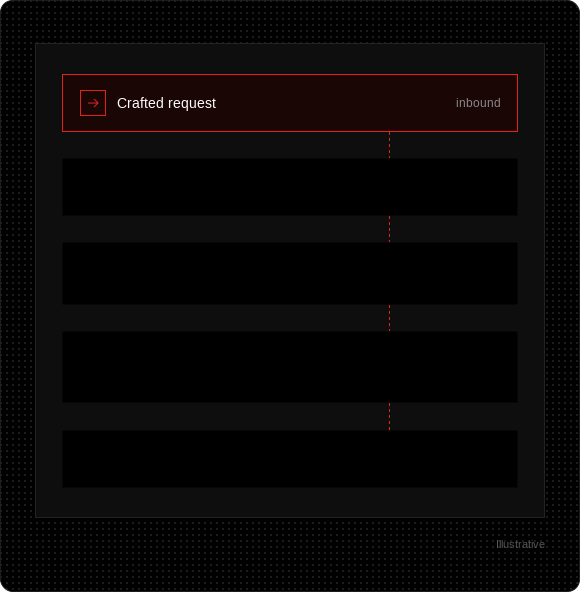
Exploit path from a crafted request through application code into an open source library function, where ADR detects the exploitation and blocks it while the app keeps running.

How ADR differs from WAF, RASP, EDR, and CNAPP

Vendors from neighboring categories now use the ADR label for very different products. The reliable test is what each one can actually see.

Category
Visibility
Blind spot
WAF
Incoming requests at the edge, matched against known attack patterns
Anything the application does once a request gets through
RASP
Risky calls within each application that has the agent installed
Apps without the agent, and activity outside the process
EDR
Host and endpoint activity: processes, files, memory
The specific function and library that triggered the activity
Workload protection (CWP)
Syscalls, process trees, and drift on hosts and containers
The application code path behind each syscall
CNAPP
Cloud configuration, cloud API and identity anomalies, often workload threats
What happens inside the application
ADR
Exploitation within running applications, ideally down to the function, and the activity that follows
Cloud configuration and identity posture (use alongside CNAPP); support differs by platform and language runtime

Every one of these tools earns its place. ADR is the layer built to detect exploitation inside running applications as it happens, and to connect it to what the attacker does next.

Six capabilities to look for in an ADR solution

Flagging suspicious behavior is the baseline. These six capabilities separate full protection from products that leave gaps:

1

Visibility down to the function

The solution knows which functions and libraries run in production and links every runtime event to the call stack behind it.

2

Detection that doesn't depend on known threats

It identifies exploitation by technique and by departures from expected application behavior. That covers zero-days, plus bugs in your own code that will never receive a CVE.

3

Precise prevention

It blocks the malicious operation while the application keeps running, and it can virtually patch a known vulnerability until the real fix is deployed. Ask each vendor to separate what it can block from what it can only alert on.

4

Context in every alert

Each detection includes the exploited function, the library, the call stack, the request, workload details, and the CVE when there is one, so responders start from the root cause.

5

Protection for software you didn't write

Coverage extends to open source, commercial, and third-party applications, not just code your developers can change.

6

Correlation across layers

It traces an attack from the application into the container, host, and cloud, and sends findings to your SIEM, SOAR, CNAPP, and vulnerability management tools.

Why application context changes detection

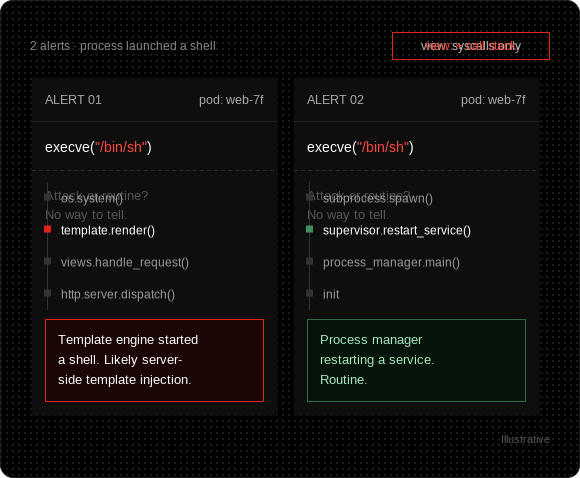
A single system call can mean an attack or a routine operation. Picture two alerts that both report a process launching a shell (/bin/sh). A tool that only sees system calls has two choices: raise both, or suppress both.

Add the call stack and the two events separate immediately. The first shell was launched by a template rendering function, which points to server-side template injection. The second came from a process manager restarting a service. Template engines have no business starting shells; process managers do it all the time.

Signatures are accurate for known threats but break when attackers change the payload. Technique-based rules target a behavior, such as code execution from a template engine, so one rule can cover an entire vulnerability class. Behavioral baselines can catch something new but take time to learn and can be noisy. Ask vendors which they combine, and what protects you while a baseline learns.

Two alerts for the same /bin/sh system call. The call stack shows one came from template rendering (likely injection) and the other from a process manager (routine).

How ADR solutions observe applications

How a product observes your applications decides what it can detect, what it can block, and how much it costs to operate. Most products use one of four models, sometimes combined:

In-app ADR

An agent loaded into each application's runtime. Strong visibility into supported frameworks, but you need an agent for every application and every language.

Indirect ADR, log-based

Correlates the logs and events you already collect. No new deployment, but it infers attacks after they happen and cannot block them.

Indirect ADR, traffic-based

Analyzes network and API traffic. Good for API discovery, but it only sees inputs and outputs, not the code that runs.

Kernel-level ADR

An eBPF sensor per host that rebuilds the application call stack from the kernel. It can cover both in-house and third-party applications with no code changes, mainly on Linux.

The full guide breaks down the strengths and trade-offs of each model and includes the architecture questions that separate vendors.

Response: from alerts to blocking

Most teams start with alerts and turn on blocking as trust builds. What differs is how precise the response is:

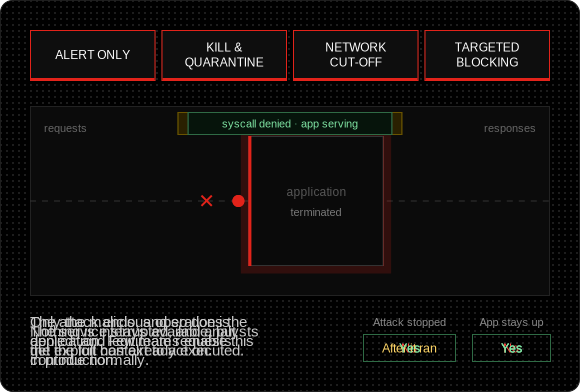
  • Alert only: nothing is interrupted, and analysts get the full context to act on.
  • Kill and quarantine: the attack ends, and so does the application. Few teams enable this in production.
  • Network cut-off: the service stays available, but the exploit has already executed, and a repeat attempt from another address still works.
  • Targeted blocking: only the malicious operation is denied, and legitimate requests continue normally.

Find out whether a vendor's blocking prevents the malicious operation from running or contains the workload once it already has. Isolating a workload or revoking a role limits damage; it doesn't prevent the exploit.

Four response modes compared: alert only, kill and quarantine, network cut-off, and targeted blocking, showing whether each stops the attack and keeps the app up.

Frequently asked questions

What does ADR stand for in security?

ADR stands for Application Detection and Response. It detects attacks against applications while they run in production and helps teams respond, ideally by blocking the malicious action without taking the application down.

Is ADR the same as RASP?

No. RASP runs an agent inside each application process and protects only the applications and frameworks it is attached to. ADR is a broader category. Some ADR solutions use in-process agents, while others observe every application on a host from the kernel, without per-app agents.

Does ADR replace CNAPP or EDR?

No. CNAPP covers cloud posture and EDR covers endpoint and host activity. ADR adds detection inside the application and works best when its findings are correlated with both. Some ADR solutions can also cover container and host threats.

How should I run an ADR evaluation?

Test every vendor on your own workloads with the same plan: deploy to a representative scope, simulate several attack classes in each language you run (including one payload the vendor hasn't seen), enable blocking on a scoped set of workloads, and measure time from alert to root cause. The full guide includes a three-week proof-of-value plan and a 45-question RFP template.

How to evaluate Application Detection and Response

Most security programs can already detect and respond to threats on endpoints, networks, identities, and cloud accounts. Production applications are the exception, even though that is where many serious exploits run. Application Detection and Response (ADR) exists to cover that blind spot.

This page covers what ADR does, where it fits next to the tools you already own, and what to look for in a vendor. The criteria are vendor-neutral.

How Oligo approaches ADR

Oligo is a kernel-level ADR platform. A single eBPF sensor on each host reconstructs the application call stack, so detections name the function, the library, and the CVE when there is one, including in third-party software you can't modify. When Oligo blocks an exploit, it denies only the offending system call and the application keeps serving traffic. It requires no code changes and sits outside the request path. Frost & Sullivan named Oligo a leader in Application Detection and Response in 2025 and 2026.